

Did you just go on a vacation or celebrate a birthday or anniversary? Do you want to relive those memories in a special slideshow that you can share with family and friends? If so, you’ll want to check out Wondershare! I recently tried out Wondershare Fantashow for Mac. It was easy uploading my pictures once the program was opened, but I had some difficulty organizing and cropping the photos. The customer service team was on it and answered my questions immediately! With Wondershare software, it’s great because you’ll get free technical support service and free life-time updates.
WONDERSHARE FANTASHOW FOR MAC
With the Wondershare Fantashow for Mac, you can showcase your story to fit any occasion with a real film feel. You can create a stylish movie using photos, videos and music with little effort! Plus, you can choose from Hollywood-style themes. Once you’ve created your movie, you can save and share your show on DVD, YouTube, iPad and more. The Wondershare Fantashow for Mac Program retails for $49.95.
This movie was created using the Wondershare Fantashow for Mac.
WONDERSHARE DVD SLIDESHOW BUILDER DELUXE
The Wondershare DVD Slideshow Builder Deluxe is easy to use and allows anyone to weave photos, video and music into a stunning DVD slideshow. You can customize your DVD slideshow with 480+ movie styles and 130+ 2D/3D transitions. You’ll look like a pro with the built-in film effects and when you’re finished, you can share these high-quality videos on YouTube, Facebook and virtually anywhere! The Wondershare DVD Slideshow Builder Deluxe reatils for $59.95.
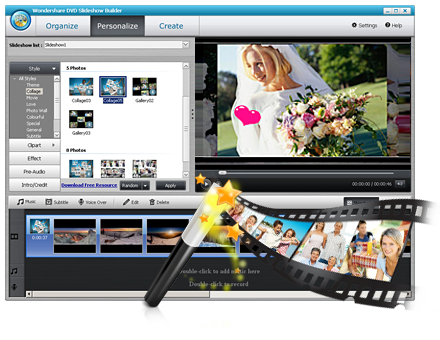
HOW TO USE WONDERSHARE DVD SLIDESHOW BUILDER DELUXE
Wondershare DVD Slideshow Builder Deluxe is an easy-to-use DVD slideshow software for Windows users (Windows 8 supported). Simply download and launch the slideshow software first. You can choose from two modes: Advanced Mode and Standard Mode. Advanced Mode provides more customization features to make a personalized photo slideshow, while Standard Mode enables you to instantly make a photo movie with ready-to-use movie styles.
Next, you add your photos and videos and customize the slideshow. Transition effects will be inserted between every two photos and videos automatically. You can also click the “Personalize” and customize your slideshow. There is also the option to create DVD menus for your slideshow.
Finally, you publish the slideshow. You can save your slideshow as a DVD slideshow; save your slideshow as a video slideshow; watch the slideshow on your device; or publish your slideshow on YouTube.
You’ll love Wondershare! Wondershare has been very generous and is offering all of the readers on The Mommy-Files 50% off their purchase of the Wondershare DVD Slideshow Builder Deluxe or the Wondershare Fantashow for Mac Software!!!
GIVEAWAY
5 lucky winners will receive their choice of the (1) Wondershare DVD Slideshow Builder Deluxe or the (2) Wondershare Fantashow for Mac Software!!!
I received the Fantashow for Mac Software from Wondershare to facilitate this review. The giveaway was sponsored by Wondershare. All opinions expressed in this post are 100% mine.
It would a weekend getaway for hubby and I without the kids!
I would love this to take pics of my daughters wedding, Next spring in florida, then slideshow it at her reception two months later! I think it would work SO perfectly! thanks!
i would love to do this with my daughters early baby photos
baby photos of my two boys
vacation photos. We are headed for disney in june. thanks
Helpful info. Fortunate me I found your web site by chance, and I am
shocked why this twist of fate didn’t tok place in advance!
I bookmarked it.